

This is Workforce Optimization Suite,
Manage Workforce, to improve Efficiency

Project Overview
Workforce Optimization Suite is aimed at increasing the efficiency of the working of this complex machine that is a customer service operation or Contact Centre.
It comprises of modules to facilitate the planning and optimizing
-- Forecasting, Scheduling, Rostering, Intraday.
Process
RESEARCH
The scope of the product was to be defined keeping in mind the existing working of the users. For this, their existing way of performing forecasting task from Excel was to be deeply understood. The flow of this Excel document from Forecasting, to Intraday and Scheduling, was very important to be chalked out. Having a system meant that it had to learn from this.
This would also lead to effectively closing down certain roles for the workforce planners, thus was crucial to navigate.
Since [24]7 has an in-house research team, a huge chunk of the research that they took up was regarding this project. Some of the key findings are below.


Overall flow of staffing transcending over forecast, scheduling, and rostering.
An example as to how from past data, number of agents required is presently calculated.


USERS
Forecast would affect all strata of the contact centre. Thus, all the roles within the centre are as follows, with their ratio against each agent.

The following task flow diagram shows connection among the above users. It demonstrates the tasks that any two users of the system have with each other.

The above task flow diagram is converted into a connection diagram. This displays the quantum of information transfer from each role to another.

Of all the above roles, the workforce optimisation suite (WFO) affects all, however for Forecast, narrowing it down to,
The primary user for forecast is the Workforce Manager, and the Planner
The user of the forecasted data is the Team Lead and the RTM.

WFM
Userbase ~ 5


Planner
Userbase ~ 5
Team Lead
Userbase ~ 50

Real Time Manager
Userbase ~ 5
FLOW
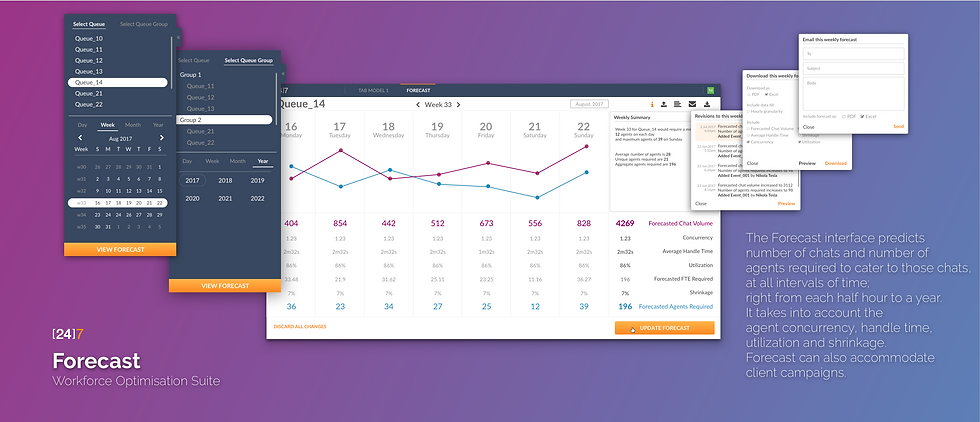
The flow for Forecast simplified to a great extent. It is split up into basic tasks of Viewing, Sending and Downloading a forecast thus generated.

Tasks
Planner's primary task is to predict the number of chats that may come at any given hour of any given day. Based on this data, she also predicts the number of agents that might be required. For this purpose, she uses metrics such as AHT, Utilization, Concurrency, and so on.
A planner is then expected to send this forecast to the LOB manager and the Client. The LoB Manager and the Client, both have to accept the forecasted number and then the workforce allotment process begins, by scheduling and rostering.
The planner can also download the forecast for other management and presentation purposes.
In case the planner has new information which the algorithm hasn't considered, such as a power outage, natural calamity, or a strike, or just customer campaigns, the planner has to enter the expected deviations from the system generated forecast.
Design Sprint
A design sprint was conducted over a week with all the stakeholders. The output of the sprint was a clickthrough low fidelity prototype that was tested with the users.


The design Sprint consisted of the representatives from the User group, Engineering and Development, Architect, Design and the Sponsor.
It jumpstarted the product and the learnings from it led to the evolution of the interface below.

Execution
Iterations
Explorations and Evolution

v2.1
The initial iteration involved pairing up of graphs of any two metrics against each other to gain insights. This v2.x underwent user testing
v2.2
A screen to show revising the forecast through the graphical view. There is a provision for the system to suggest better values and to save a scenario.


v2.5
This screen exhibits the graphical information in a tabular format to adhere to the current mental model of the user.

v2.6
This screen exhibits the editing capability in the tabular representation. It also highlights the deviation of the current versus revised values.

v4.1
This is a wire of the new layout.
This layout laid the path for the current interface.

v4.3
The information is collated in sections and only the most relevant information is displayed to the user. There is a dedicated section for editing.

v6.1
This final layout was reached through this iterative process. It aims to display only the needed elements and hides everything else.
v6.9
This final interface was designed, tested, developed and put into production and now is used by the users for forecasting purposes.

Design Decision Document
There are always a lot of decisions that are taken while any product is being made. They are the ones who lay a path for each product and drive them ahead.
This document consists of all the decisions ranging from why a line graph was selected to why a certain label on a certain button. It strives to act as a guiding principle for the design.
Vision Document
The most pivotal work is to pen down a vision for a product. Being the lead designer for Workforce Optimisation, I got the opportunity to map the path of the entire WFO tool and everything that comes with it.
Right from intersecting roadmaps, to automation and algorithm requirements.
I was awarded Above and Beyond for envisioning this end to end.
The demo prototype video flow,

Intraday
Real-Time management and Performance Optimization
The subsequent task was to look at managing the workforce within the given shift or day, based on the performance of the floor.

